Java爬虫采集网页数据
一、简单介绍爬虫
网络爬虫(又称为网页蜘蛛,网络机器人,在FOAF社区中间,更经常的称为网页追逐者),是一种按照一定的规则,自动地抓取万维网信息的程序或者脚本。
了解过爬虫的同学都知道,现在的爬虫,80%是用Python写的:
原因一:因为现在的网络协议大多基于HTTP/HTTPS ,而java的基本框架支持的是TCP/IP 网络协议,构建爬虫时需要导入大量底层库;
原因二:Python 具有很多的爬虫开源库,好用的飞起,Java的也有,但是java上手难度大;
原因三:Python 语言简洁,理解难度较小,相较之下,java的语言较为复杂,理解难度也随之提升;
OK,回到我们本次的主题,改例是基于JavaClient做的简单实现Java Maven工程采集图片数据的爬虫!
二、需要的pom.xml依赖
1
2
3
4
5
6
7
8
9
10
11
12
13
14
15
16
17
18
19
20
21
| <!-- https:
<dependency>
<!-- 对Html文件解析 -->
<groupId>org.jsoup</groupId>
<artifactId>jsoup</artifactId>
<version>1.8.3</version>
</dependency>
<!-- 文件下载 -->
<dependency>
<groupId>commons-io</groupId>
<artifactId>commons-io</artifactId>
<version>2.5</version>
</dependency>
<!-- https:
<dependency>
<groupId>org.apache.httpcomponents</groupId>
<artifactId>httpclient</artifactId>
<version>4.5.5</version>
</dependency>
|
有的同学创建Maven工程后,程序还是运行出错!只要将一下三点修改就阔以咯!(基于JDK1.8)
1.修改pom.xml依赖中的JDK版本号
1
2
3
4
5
6
| <properties>
<project.build.sourceEncoding>UTF-8</project.build.sourceEncoding>
<!-- 默认为1.7,修改为1.8即可 -->
<maven.compiler.source>1.8</maven.compiler.source>
<maven.compiler.target>1.8</maven.compiler.target>
</properties>
|
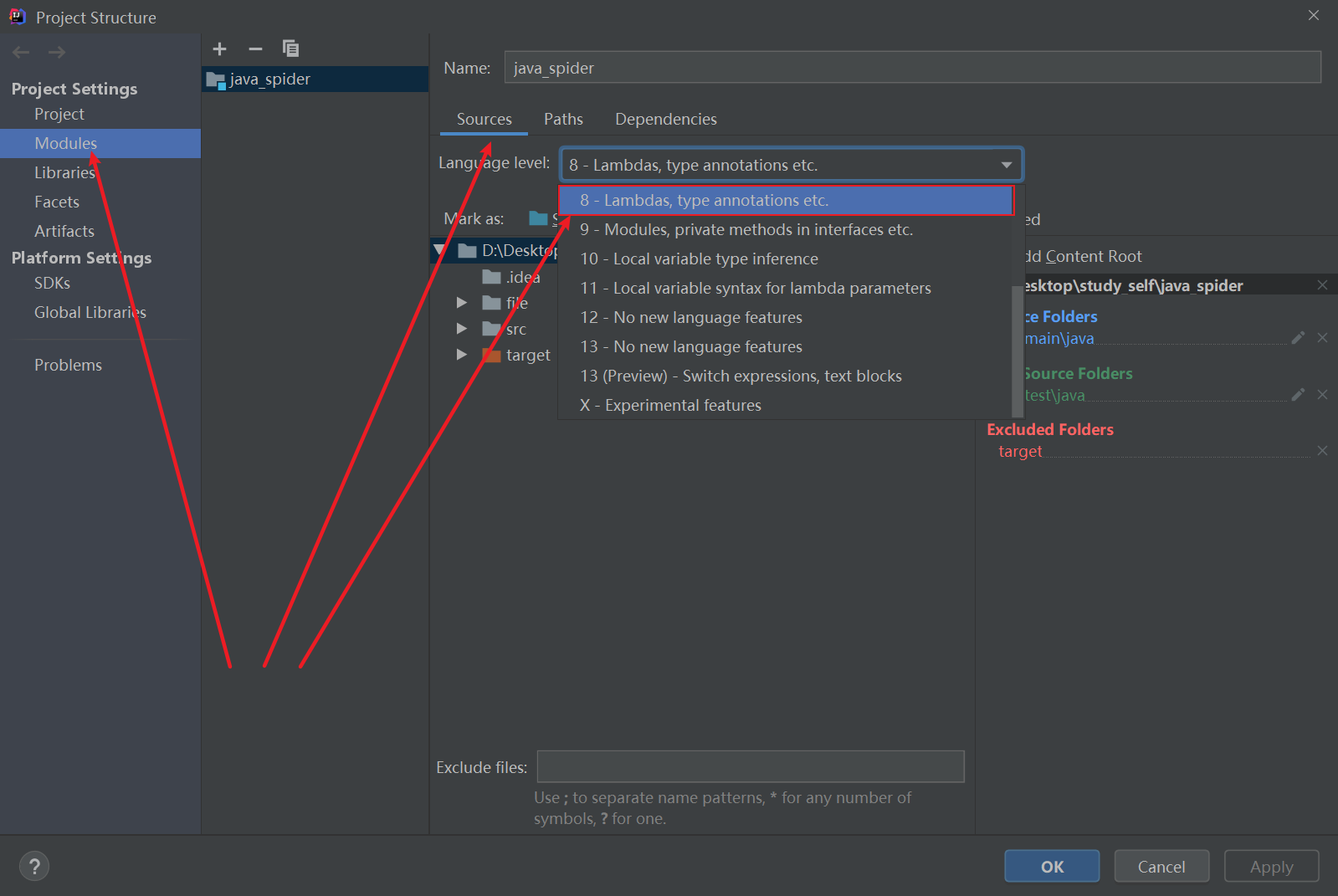
2.按如下图,找到工程结构图标,进去后Project Settings –> Modules –>Souces–>Language level:设置成8;
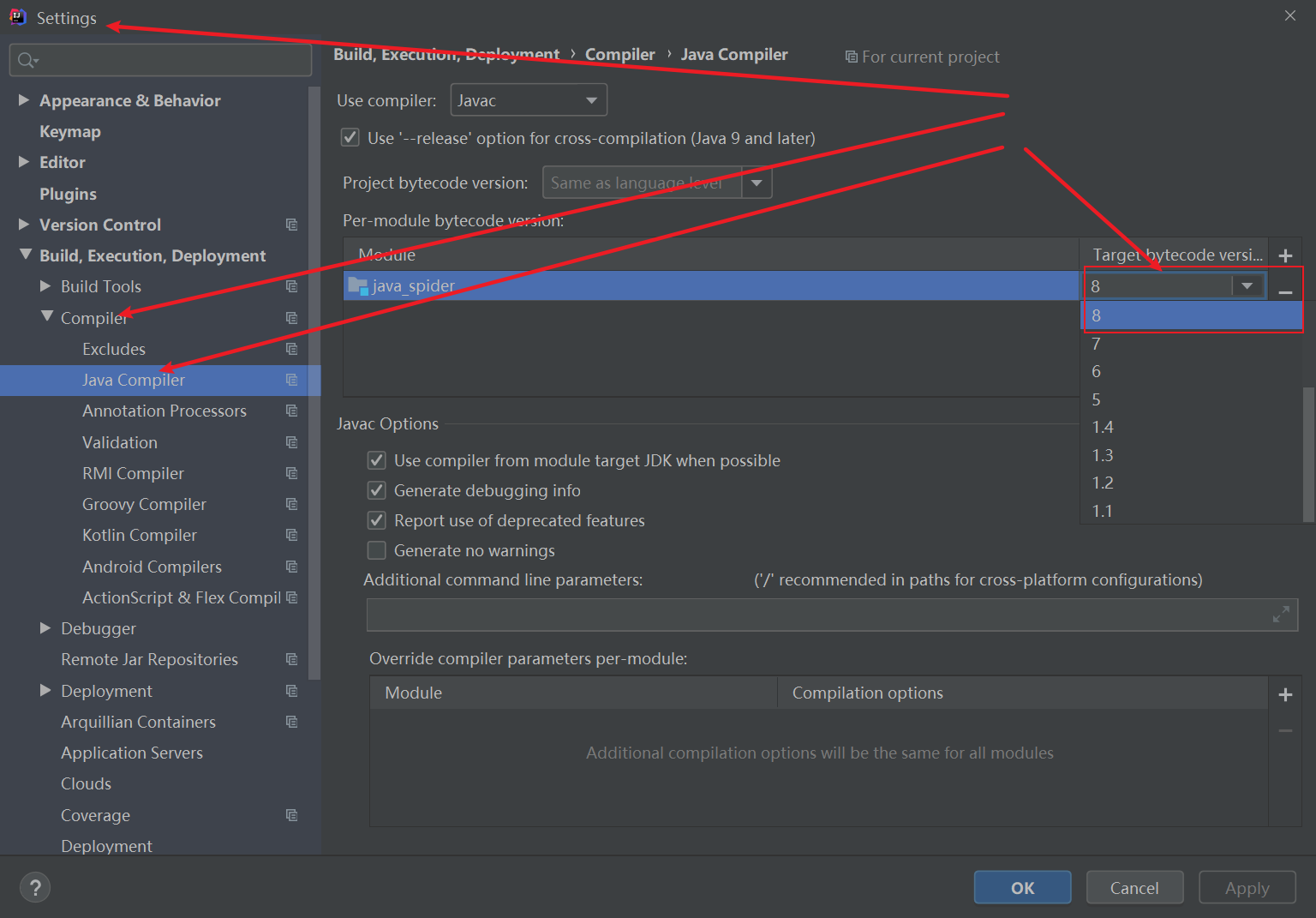
3 进入工程setting文件中,Settings–>Build,Execution,Deployment–>Compiler–>Java Compiler–>Moudle:配置JDK版本为8;
三.java代码(内附详细注释)
因为我这里是个简单的java爬虫,所以就只用了一个全写成静态方法的java文件,方便调用
爬取图片以并下载到本地
scenery.java
1
2
3
4
5
6
7
8
9
10
11
12
13
14
15
16
17
18
19
20
21
22
23
24
25
26
27
28
29
30
31
32
33
34
35
36
37
38
39
40
41
42
43
44
45
46
47
48
49
50
51
52
53
54
55
56
57
58
59
60
61
62
63
64
65
66
67
68
69
70
71
72
73
74
75
76
77
78
79
80
81
82
83
84
85
86
87
88
89
90
91
92
93
94
95
96
97
98
99
100
101
102
103
104
105
106
107
108
109
110
111
112
113
114
115
116
117
118
119
120
121
122
123
124
125
126
127
128
129
130
131
132
133
134
135
136
137
138
139
140
141
142
143
144
145
146
147
148
149
150
151
152
153
154
155
156
157
158
159
160
161
162
163
164
165
166
167
168
169
170
171
172
173
174
175
176
177
178
179
180
181
182
183
184
185
186
187
188
189
190
191
192
193
194
195
196
197
198
199
200
201
202
203
204
205
206
207
208
209
210
211
212
213
214
215
216
217
218
219
220
221
222
223
224
225
226
227
228
229
230
231
232
233
| import org.apache.http.HttpEntity;
import org.apache.http.HttpStatus;
import org.apache.http.client.ClientProtocolException;
import org.apache.http.client.methods.CloseableHttpResponse;
import org.apache.http.client.methods.HttpGet;
import org.apache.http.impl.client.CloseableHttpClient;
import org.apache.http.impl.client.HttpClients;
import org.apache.http.util.EntityUtils;
import java.io.*;
import java.util.Scanner;
import java.util.ArrayList;
import java.util.List;
import java.util.regex.Matcher;
import java.util.regex.Pattern;
public class scenery {
private static final String ENCODING = "UTF-8";
private static final String SAVE_PATH = "file/background";
public static String getHtmlResourceByUrl(String url) {
CloseableHttpClient httpClient = HttpClients.createDefault();
HttpGet httpGet = new HttpGet(url);
HttpEntity httpEntity = null;
String html = null;
httpGet.setHeader("Connection", "keep-alive");
httpGet.setHeader("User-Agent", "Mozilla/5.0 (Windows NT 10.0; WOW64) AppleWebKit/537.36 (KHTML, like Gecko) Chrome/63.0.3239.132 Safari/537.36");
CloseableHttpResponse httpResponse = null;
System.out.println("开始请求网页!!!!!!!!");
try {
httpResponse = httpClient.execute(httpGet);
httpEntity = httpResponse.getEntity();
html = EntityUtils.toString(httpEntity);
} catch (IOException e) {
e.printStackTrace();
}
return html;
}
public static List<String> getTitleUrl(String html){
String regex_img_url = "<img src=\"(.*?)\" alt=";
String regex_img_title = "<div class=\"tits\">(.*?)<b class=hightlight>";
ArrayList<String> list = new ArrayList<>();
Pattern img_url_p = Pattern.compile(regex_img_url);
Pattern img_title_p = Pattern.compile(regex_img_title);
Matcher img_url_m = img_url_p.matcher(html);
Matcher img_title_m = img_title_p.matcher(html);
while (img_url_m.find() && img_title_m.find()) {
String url = img_url_m.group(1);
list.add(url);
String title = img_title_m.group(1);
list.add(title);
}
return list;
}
public static List<String> getImageSrc(String details_html){
List<String> list = new ArrayList<>();
String imgRegex = "<img src=\"(.*?)\" alt=";
Pattern img_p = Pattern.compile(imgRegex);
Matcher img_m = img_p.matcher(details_html);
System.out.println("开始解析...");
while (img_m.find()){
list.add(img_m.group(1));
}
return list;
}
public static void downLoad(String imgUrl,String filePath, String title, String imageName,int page, int count) {
CloseableHttpClient httpClient = HttpClients.createDefault();
HttpGet httpGet = new HttpGet(imgUrl);
try {
CloseableHttpResponse response = httpClient.execute(httpGet);
System.out.println("第" +page+ "页的" + title + "系列图片开始下载:" + imgUrl);
if (HttpStatus.SC_OK == response.getStatusLine().getStatusCode()) {
HttpEntity entity = response.getEntity();
InputStream imgContent = entity.getContent();
saveImage(imgContent, filePath,imageName);
System.out.println("第" + (count + 1) + "张图片下载完成名为:" + imageName);
}
} catch (ClientProtocolException e) {
e.printStackTrace();
} catch (IOException e) {
e.printStackTrace();
}
}
public static void saveImage(InputStream is, String filePath, String imageName){
try {
String imgSavePath = filePath.concat("/" + imageName + ".jpg");
File imgPath = new File(imgSavePath);
if (!imgPath.exists()) {
imgPath.createNewFile();
}
FileOutputStream fos = new FileOutputStream(imgPath);
byte[] bytes = new byte[1024 * 1024 * 1024];
int len = 0;
while ((len = is.read(bytes)) != -1){
fos.write(bytes, 0, len);
}
fos.flush();
fos.close();
} catch (IOException e) {
e.printStackTrace();
}finally {
try{
is.close();
} catch (IOException e) {
e.printStackTrace();
}
}
}
public static void run(){
String title = "";
Scanner input = new Scanner(System.in);
System.out.println("*********************欢迎来到洋群满满壁纸下载地,请选择你想要下载序列的序号!*********************");
System.out.println("1>>>风景|2>>>美女|3>>>汽车|4>>>动漫|5>>>二次元|6>>>森林|7>>>明星|8>>>猜你喜欢(You Know!!!)");
System.out.print("请选择:");
int choose = input.nextInt();
switch (choose){
case 1:
title = "风景";
break;
case 2:
title = "美女";
break;
case 3:
title = "汽车";
break;
case 4:
title = "动漫";
break;
case 5:
title = "二次元";
break;
case 6:
title = "森林";
break;
case 7:
title = "明星";
break;
case 8:
title = "性感";
break;
default:
title = "风景";
System.out.println("选择错误,默认采集风景系列图片!!!");
break;
}
int page = 1;
for (; page <= 5; page++) {
String url = "https://www.3gbizhi.com/search/2-" + title + "/" + page + ".html";
String html = getHtmlResourceByUrl(url);
List<String> list = getTitleUrl(html);
for (int i = 0; i < list.size(); i+=2) {
String detail_url = list.get(i);
String detail_title = list.get(i + 1);
System.out.println(detail_url);
System.out.println(detail_title);
File imgFile = new File(SAVE_PATH + "/" + title);
if (!imgFile.exists()) {
imgFile.mkdirs();
}
downLoad( detail_url.split("\\.jpg")[0] + ".jpg",imgFile.getPath(),title,detail_title,page,i);
}
}
}
public static void main(String[] args) {
run();
}
}
|